Showing posts written by:

markcane

UI Tips and Tricks – Inline Visualforce Resize

A real frustration with inline Visualforce pages (added to standard page layouts) is the static nature of the height setting. From the layout we can set a specific height, but ideally we want the height set dynamically from the content height. Sounds like a simple enough requirement, however, the fact that the VF page section is implemented as an iFrame loaded from another domain makes cross-domain communication a non-trivial task. Note, for security reasons browsers enforce a same-origin policy, preventing script running across domain boundaries. Workarounds to this restriction include the HTML5 postMessage function on the client and proxy services on the server. So the question becomes, how can the iFrame content communicate across domains to tell the host page the correct height for the iFrame? The answer to this is somewhat contrived, but hopefully my basic approach below tells a clear enough story.

Here we go.
1. The inline VF page contains an iFrame, into which we load a helper script file from the base salesforce domain with a height parameter in the querystring.

document.getElementById(‘helpframe’).src=’https://emea.salesforce.com{!$Resource.iFrameHelper}?height=’+h+’&iframename=MYPAGENAME&cacheb=’+Math.random();

The random parameter is there to avoid caching issues. Crucially as this helper script is running on the same domain as the standard page layout, it can call a script in the page itself. Note the helper script is loaded from a static resource. To keep the solution generic the page name is passed as a parameter also, handily the title attribute in the host page is set to the page name, we’ll use this later to find the id for the iFrame.

2. In the helper script we extract the 2 parameters from the querystring and call a script function in the host page (via parent.parent – which traverses up the DOM to the parent page).

3. In order to add script to the host page we use the Sidebar injection technique (or hack) and introduce a simple Javascript function (via a narrow component) which takes the page name and height, finding the former in the DOM using Ext.query (Ext is already referenced in the page), and setting the element height to the latter.

Example solution components::

0. Pre-requisites:
User Profiles must have the “Show Custom Sidebar On All Pages” General User Permission ticked.

1. Add a HTML file static resource, named iFrameHelper – content below.
[sourcecode language=”html”]
<html>
<body onload="parentIframeResize()">
<script>
// Tell the parent iframe what height the iframe needs to be
function parentIframeResize(){
var height = getParam(‘height’);
var iframename = getParam(‘iframename’);
// This works as our parent’s parent is on our domain..
parent.parent.resizeIframe(height,iframename);
}
// Helper function, parse param from request string
function getParam(name){
name = name.replace(/[\[]/,"\\\[").replace(/[\]]/,"\\\]");
var regexS = "[\\?&]"+name+"=([^&#]*)";
var regex = new RegExp( regexS );
var results = regex.exec( window.location.href );
if( results == null )
return "";
else
return results[1];
}
</script>
</body>
</html>
[/sourcecode]

2. Add a HTML sidebar component (narrow left) – click “Show HTML” and paste in markup below.
[sourcecode language=”html”]
<script>
function resizeIframe(h, ifn){
var e = Ext.query("iframe[title=’"+ifn+"’]");
console.log(e);
var itarget = e[0].getAttribute(‘id’);
Ext.get(itarget).set({height: parseInt(h)+10});
}
</script>
[/sourcecode]

3. Add a Visualforce page named MyTestInlineVFPage – paste in markup below.
[sourcecode language=”html”]
<apex:page docType="html-5.0" standardController="Account">
This is your new Page<br/>

<script type="text/javascript">
function resizeParentIFrame(){
var h = document.body.scrollHeight;
//TODO – replace with the relevant page name.
var iframename = ‘MyTestInlineVFPage’;
//TODO – replace with the relevant base url – page runs on the VF domain so functions return the VF domain.
var baseUrlForInstance = ‘https://emea.salesforce.com&#8217;;
document.getElementById(‘helpframe’).src = baseUrlForInstance+'{!$Resource.iFrameHelper}?height=’+h+’&iframename=’+iframename+’&cacheb=’+Math.random();
}

function forceParentIFrameResize(){
document.getElementById(‘helpframe’).src=document.getElementById(‘helpframe’).src;
}

window.onload=function(){
resizeParentIFrame();
}
</script>
</apex:page>
[/sourcecode]

4. Add the VF page to a new section on an Account layout.

The solution above needs further work in the areas below. I’m planning to improve this as part of a commercial AppExchange package I’m working on and will post the improved resize solution.

Code quality.
Exception handling.
Calculation of the base salesforce domain – currently hardcoded in the inline page.

I’d be delighted to hear about other improvements, or indeed alternative approaches.

Salesforce Ant Scripts – Selenium

The Salesforce metadata API is an extremely powerful tool, when combined with Ant, Jenkins etc. for build automation. There is however a number of configuration items that simply can’t be retrieved and deployed using this API (Account Teams, Support Settings, Lead Settings, Case Assignment and Escalation Rules etc.). The unsupported list can be found here, unfortunately the platform expands at a rate more or less equal to the rate at which coverage of the API has increased over time. Anyway, my point here is that typically deployments have three steps; a manual step to cover the gaps in the metadata API (pre-requisites), an automated deployment step (retrieve-and-deploy with Ant) and finally a data population step (Data Loader CLI with Ant perhaps..). Leaving data to one side (for this post), an ability to merge steps 1 and 2 would enable full automation of the deployment of configuration – which in most cases would be a good thing. One approach to automate step 1 is to write Selenium web browser automation scripts which drive the Salesforce application at the UI level. The scripts can be exported as JUnit test cases and then be incorporated into an Ant based build process and automated. My approach to doing this is outlined below, as with most things there are many ways to achieve the same result and I’m sure this can be improved on, however it keeps the process simple and gets the job done which tends to work for me. Additionally, the approach plays well with Ant, Jenkins/Hudson etc.. so it should be straightforward to extend an existing build process.

1. Install the Selenium IDE Firefox Extension.
2. Using Selenium IDE record the act of logging-in to Salesforce and making the required configuration changes.
3. Export the test case as a Java / JUnit 4 / WebDriver file. This creates a .java file as below. The example simply creates a Chatter post for the logged-in user, hopefully this is simple and illustrative enough to make the point.
[sourcecode language=”java”]
package com.example.tests;

import java.util.regex.Pattern;
import java.util.concurrent.TimeUnit;
import org.junit.*;
import static org.junit.Assert.*;
import static org.hamcrest.CoreMatchers.*;
import org.openqa.selenium.*;
import org.openqa.selenium.firefox.FirefoxDriver;
import org.openqa.selenium.support.ui.Select;

public class SeleniumTest {
private WebDriver driver;
private String baseUrl;
private boolean acceptNextAlert = true;
private StringBuffer verificationErrors = new StringBuffer();

@Before
public void setUp() throws Exception {
driver = new FirefoxDriver();
baseUrl = "https://test.salesforce.com/&quot;;
driver.manage().timeouts().implicitlyWait(30, TimeUnit.SECONDS);
}

@Test
public void testSelenium() throws Exception {
driver.get(baseUrl + "/");
driver.findElement(By.id("username")).clear();
driver.findElement(By.id("username")).sendKeys("release.manager@force365.com");
driver.findElement(By.id("password")).clear();
driver.findElement(By.id("password")).sendKeys("mypassword");
driver.findElement(By.id("Login")).click();
driver.findElement(By.id("publishereditablearea")).clear();
driver.findElement(By.id("publishereditablearea")).sendKeys("new Chatter post – Selenium");
driver.findElement(By.id("publishersharebutton")).click();
}

@After
public void tearDown() throws Exception {
driver.quit();
String verificationErrorString = verificationErrors.toString();
if (!"".equals(verificationErrorString)) {
fail(verificationErrorString);
}
}

private boolean isElementPresent(By by) {
try {
driver.findElement(by);
return true;
} catch (NoSuchElementException e) {
return false;
}
}

private String closeAlertAndGetItsText() {
try {
Alert alert = driver.switchTo().alert();
if (acceptNextAlert) {
alert.accept();
} else {
alert.dismiss();
}
return alert.getText();
} finally {
acceptNextAlert = true;
}
}
}
[/sourcecode]

4. Modify the test case java code as required.
5. Download the Java Selenium Client Driver from http://seleniumhq.org/download/
6. Extend or create a new Ant build file to compile and execute the test case. My example below requires a [selenium\src] sub directory structure in the build root, with the .java test case files placed in the src directory.
[sourcecode language=”xml”]
<project basedir="." default="usage" name="invoke Selenium script to configure Salesforce org">
<property name="bin" value=".\selenium\bin" />
<property name="lib" value="c:\Release Management\selenium-2.28.0\libs" />
<property name="src" value=".\selenium\src" />
<property name="report" value=".\selenium\reports" />

<target name="usage" depends="">
<echo message="Compiles and executes Selenium IDE exported test cases (source format JUnit4 WebDriver .java files)" />
</target>

<target name="init">
<delete dir="${bin}" />
<mkdir dir="${bin}" />
</target>

<target name="compile" depends="init">
<javac includeantruntime="false" source="1.7" srcdir="${src}" fork="true" destdir="${bin}" >
<!– requires Selenium test cases exported as JUnit4 WebDriver .java files in the src sub-directory –>
<classpath>
<pathelement path="${bin}">
</pathelement>
<fileset dir="${lib}">
<include name="**/*.jar" />
</fileset>
</classpath>
</javac>
</target>

<target name="exec" depends="compile">
<delete dir="${report}" />
<mkdir dir="${report}" />
<mkdir dir="${report}/xml" />

<junit printsummary="yes" haltonfailure="yes">
<classpath>
<pathelement path="${bin}">
</pathelement>
<fileset dir="${lib}">
<include name="**/*.jar" />
</fileset>
</classpath>
<test name="com.example.tests.SeleniumTest" haltonfailure="yes" todir="${report}/xml" outfile="SeleniumTest-result">
<formatter type="xml" />
</test>
</junit>

<junitreport todir="${report}">
<fileset dir="${report}/xml">
<include name="TEST*.xml" />
</fileset>
<report format="frames" todir="${report}/html" />
</junitreport>
</target>
</project>
[/sourcecode]

Note. There is no need to start or stop a Selenium server as the script runs locally on the build server – Firefox will be required however if you stick with the default browser in recorded scripts.

I’ll follow this initial post with further detail on the following;
1. Conditional script logic – i.e. I want the script to check for a condition before making a change such that it selectively configures and therefore won’t be reliant on a clean, predictable state.
2. Execution of test suites rather than individual cases.
3. Most likely I’ll refine the build.xml example as I understand more about this.

Salesforce Ant Scripts – Post Retrieve Modification

If your deployment process involves manual modification of the metadata files between retrieve and deploy steps, it’s time to consider extending your knowledge of Ant. This is critical for Continuous Integration where manual processes are an anathema. With a small amount of Ant knowledge you can delete metadata files, edit and replace/remove content via regex, copy files into the directory structure, invoke Selenium scripts to perform configuration tasks at the UI level (addressing gaps in the metadata API perhaps) and so on and so forth. In short, understanding the potential of Ant is key to delivering build automation.

One exemplar use case for post-retrieve modification is deploying metadata from orgs with Social Contacts enabled – errors can arise as below due inconsistencies in the retrieval of the SocialPost object and related metadata.

SocialPost-Social Post Layout.layout(SocialPost-Social Post Layout):Parent entity failed to deploy
No Layout named SocialPost-Social Post Layout found

In this use case, to get the metadata to deploy we need to remove profile references to the SocialPost layout and then remove the layout file itself. The example build file below shows how this can be achieved. In addition, sandbox email address suffixes are also updated to match the target sandbox – a fairly common deployment issue with sandboxes and workflow alerts, dashboard running users etc.

Build File – Retrieve Org Metadata, Modify & Deploy to Org
[sourcecode language=”xml”]
<project xmlns:sf="antlib:com.salesforce" basedir="." default="deploy_ci" name="org to org">
<property file="build.properties" />
<property environment="env" />

<target name="retrieve_dev" depends="">
<echo message="retrieving metadata to ${metadata.root}" />
<sf:retrieve unpackaged="${metadata.root}/package.xml" retrieveTarget="${metadata.root}" singlePackage="true" serverurl="${dev.sf.org.serverurl}" password="${dev.sf.org.password}" username="${dev.sf.org.username}" />
</target>

<target name="update_email_address_suffixes" depends="retrieve_dev">
<echo message="updating email addresses in ${metadata.root}…" />
<replaceregexp match="${dev.sf.org.suffix}" replace="${ci.sf.org.suffix}" flags="gs" byline="false">
<fileset dir="${metadata.root}" />
</replaceregexp>
</target>

<target name="remove_social_post_from_profiles" depends="update_email_address_suffixes">
<echo message="updating profiles to remove Social-Post references in ${metadata.root}…" />
<replaceregexp match="^ &lt;layoutAssignments&gt;\n &lt;layout&gt;SocialPost-Social Post Layout&lt;/layout&gt;\n &lt;/layoutAssignments&gt;$" replace="" flags="gm" byline="false">
<fileset dir="${metadata.root}\profiles" includes="**/*.profile" />
</replaceregexp>
</target>

<target name="delete_social_post_files" depends="remove_social_post_from_profiles">
<echo message="deleting Social-Post related files from ${metadata.root}…" />
<delete file="${metadata.root}\workflows\SocialPost.workflow"/>
<delete file="${metadata.root}\layouts\SocialPost-Social Post Layout.layout"/>
</target>

<target name="deploy_ci" depends="delete_social_post_files">
<echo message="deploying modified metadata from ${metadata.root}…" />
<sf:deploy singlePackage="true" serverurl="${ci.sf.org.serverurl}" password="${ci.sf.org.password}" username="${ci.sf.org.username}" maxPoll="360" pollWaitMillis="20000" logType="Debugonly" rollbackOnError="true" runAllTests="${ci.sf.org.forcetests}" checkOnly="${ci.sf.org.checkonly}" deployroot="${metadata.root}">
</sf:deploy>
</target>
</project>

[/sourcecode]

Salesforce Tooling API

With the upcoming Spring 13 release (release window dates below) the new Tooling API goes GA.

11th Jan, sandbox instances
18th Jan – 9th Feb, production instances (EU0 8th Feb, EU1/2 9th Feb)

What is the Tooling API?
The full details can be found in the API guide here, in short the API is intended to provide an optimised, standardised, capable and compelling interface for tools developers. Full stop. The latter two points being key – a major complaint I’ve been hearing for a long time is the immaturity of the available developer tools and the lack of choice. Substandard tools (relative to Ruby, Java and particularly .NET etc.) can really hamper adoption within the IT department, it never ceases to surprise me how much power developers can wield particularly where strong technical leadership is absent.

The Tooling API supports both SOAP and REST styles of web service and enables working copy management for the Apex metadata types, update synchronisation and error checking as well as access to heap dumps, debug logs and so forth. All in all the provided functionality looks like all you’d need to build a rich development tool or Force.com augmentation to an existing toolset.

A new open source version of the Force.com IDE, developed with the Tooling API, will follow the GA release, no date announced.

If I had the time, my first task for 2013 would be to design and build an iPad developer app; delivering a super-efficient developer experience, integrated with GitHub etc.. Anyone who has experienced code-editing in the web app in the iPad Safari browser will surely agree, this could be a winner! I suspect other more forward thinking people will already have such things ready to ship as soon as Spring ’13 rolls out. I hope so. Looking forward to 2013 being the year of new and innovative developer tools..

Salesforce SSO with ADFS 2.0

In this post I’ll share some recent practical experiences implementing Federated SSO between Salesforce and Active Directory Federation Services 2.0 (ADFS 2.0 for brevity). For detailed configuration and theoretical information on this subject please refer to the excellent resources below.

http://blog.rhysgoodwin.com/cloud/salesforce-sso-with-adfs-2-0-everything-you-need-to-know/
http://wiki.developerforce.com/page/Single_Sign-On_with_Force.com_and_Microsoft_Active_Directory_Federation_Services

To set the scene – the “deployment view” schematic below shows the building blocks of a complex implementation covering most if not all possible access scenarios including portals, public web access, mobile user agents etc.

SSO ADFS

Deployment Considerations

– Salesforce
Two points to make here, firstly to emphasise the fact that all communication is routed through the browser running on the local machine (SAML 2.0 Browser Post Profile), there is no direct communication between Salesforce and ADFS proxy etc.. The second point being the importance of the introduction of a My Domain to the org, this is required for service provider initiated SSO and is necessary for mobile apps, Chatter desktop, Salesforce for Outlook and deep-links to function correctly with SSO.

– ADFS 2.0 Deployment Topology
Ideally, the ADFS configuration database should be deployed on a fault-tolerant, load-balanced SQL Server cluster – avoid the Windows internal database if you’re looking at a high-availability design. This is particularly advisable if your organisation has this SQL Server infrastructure in place. The ADFS 2.0 server role can also be deployed in a Federation Server Farm configuration, with active servers load balanced on a single virtual IP and connected to the shared configuration database. There is huge flexibility here in terms of redundancy and load-balancing configurations. The ADFS servers and configuration database host should be deployed within the corporate network, not the DMZ.

In a multi-org deployment, to workaround the unique service provider certificate limitation preventing more than one Salesforce org as a service provider in ADFS follow the instructions here.

http://help.salesforce.com/apex/HTViewSolution?id=000163471&language=en_US

– ADFS Proxy
There are other options in terms of routing inbound traffic through the DMZ, however ADFS proxy is a popular, free and secure option. A farm configuration should be deployed, with multiple (at least 2) load balanced servers behind a virrtual IP.

– Public DNS
In SAML terms a Salesforce org can be Service Provider to one (and only one) Identity Provider. In defining the single set of settings, the Identity Provider login URL must be entered. This url has to be accessible from the local machine of all prospective users, those who are connected to the corporate network and potentially those who aren’t. In order to support external users the Identity Provider host name must be resolvable by the public DNS to a secure server presenting a certificate signed by a root CA. An internal CA signed certificate is acceptable if there are no external access scenarios to consider and all SSO attempts will be made by users connected to the corporate network via cable or VPN.

– Internal DNS
Internal users must resolve the ADFS url (Identity Provider login URL) directly to the internal ADFS server host, whilst external users will resolve via public DNS registry. The internal override is key, this is necessary to ensure that Windows Integrated Authentication takes place, plus avoids an expensive routing via the public internet. Ideally this can be achieved simply via the internal DNS. In cases where internal users connect externally from the same machine (outside of a VPN connection), a localhost file entry would be problematic.

– ADFS Claim Rules (Transform)
Defined rules can (and should) be exported to a file, as a backup and convenience when recreating Relying Party Trusts within ADFS). The link below provides the Powershell instructions for this.

http://social.technet.microsoft.com/wiki/contents/articles/4869.aspx

Example rules below. Where possible use the claim rule templates (attribute population from AD, comditional static attribute population based on security group membership etc. the claim rule language is seemingly undocumented.

[sourcecode language=”text”]
@RuleTemplate = "LdapClaims"
@RuleName = "Send UPN as Name ID"
c:[Type == "http://schemas.microsoft.com/ws/2008/06/identity/claims/windowsaccountname&quot;, Issuer == "AD AUTHORITY"]
=> issue(store = "Active Directory", types = ("http://schemas.xmlsoap.org/ws/2005/05/identity/claims/nameidentifier&quot;), query = ";userPrincipalName;{0}", param = c.Value);

@RuleTemplate = "LdapClaims"
@RuleName = "Send Email Addresses as User.Email"
c:[Type == "http://schemas.microsoft.com/ws/2008/06/identity/claims/windowsaccountname&quot;, Issuer == "AD AUTHORITY"]
=> issue(store = "Active Directory", types = ("User.Email"), query = ";mail;{0}", param = c.Value);

@RuleTemplate = "LdapClaims"
@RuleName = "Send Surname as User.LastName"
c:[Type == "http://schemas.microsoft.com/ws/2008/06/identity/claims/windowsaccountname&quot;, Issuer == "AD AUTHORITY"]
=> issue(store = "Active Directory", types = ("User.LastName"), query = ";sn;{0}", param = c.Value);

@RuleTemplate = "LdapClaims"
@RuleName = "Send UPN as User.Username"
c:[Type == "http://schemas.microsoft.com/ws/2008/06/identity/claims/windowsaccountname&quot;, Issuer == "AD AUTHORITY"]
=> issue(store = "Active Directory", types = ("User.username"), query = ";userPrincipalName;{0}", param = c.Value);

@RuleTemplate = "EmitGroupClaims"
@RuleName = "Send User.ProfileId for Salesforce Standard Users"
c:[Type == "http://schemas.microsoft.com/ws/2008/06/identity/claims/groupsid&quot;, Value == "S-1-5-21-1591777566-3669593721-1616705233-599", Issuer == "AD AUTHORITY"]
=> issue(Type = "User.ProfileId", Value = "00fE0000000ryDa", Issuer = c.Issuer, OriginalIssuer = c.OriginalIssuer, ValueType = c.ValueType);

@RuleTemplate = "EmitGroupClaims"
@RuleName = "Send User.ProfileId for Salesforce Chatter Users"
c:[Type == "http://schemas.microsoft.com/ws/2008/06/identity/claims/groupsid&quot;, Value == "S-1-5-21-1591777566-3669593721-1616705233-1999", Issuer == "AD AUTHORITY"]
=> issue(Type = "User.ProfileId", Value = "00fE0000000EeCs", Issuer = c.Issuer, OriginalIssuer = c.OriginalIssuer, ValueType = c.ValueType);

@RuleTemplate = "EmitGroupClaims"
@RuleName = "Send 809 as User.Department"
c:[Type == "http://schemas.microsoft.com/ws/2008/06/identity/claims/groupsid&quot;, Value == "S-1-5-21-1591777566-3669593721-1616705299-9115", Issuer == "AD AUTHORITY"]
=> issue(Type = "User.Department", Value = "809", Issuer = c.Issuer, OriginalIssuer = c.OriginalIssuer, ValueType = c.ValueType);

@RuleTemplate = "LdapClaims"
@RuleName = "Send co as User.Country"
c:[Type == "http://schemas.microsoft.com/ws/2008/06/identity/claims/windowsaccountname&quot;, Issuer == "AD AUTHORITY"]
=> issue(store = "Active Directory", types = ("User.Country"), query = ";co;{0}", param = c.Value);
[/sourcecode]

– ADFS Claim Rules (Authorisation)
Particularly in just-in-time (JIT) user provisioning scenarios having control over who can access Salesforce via ADFS SSO can be important. In such cases one approach can be to create an AD securtity group [Salesforce Users] and add all valid AD principles. An authorisation claim rule can be added (after removing the permit all default) to restrict access to the just the group members. Note with service provider initiated SSO, i.e. the user hits the my domain first, for non-privileged users the end result will be the display of the SAML login error page, this may not be the ideal experience. For identity provider initiated SSO, i.e. the user hits ADFS first, then an ADFS error page is displayed.

– JIT provisioning
Salesforce mandates that users provisioned via a SAML assertion must have an initial user profile Id specified in an attribute within the assertion. One approach to this requirement is to use Active Directory security groups to group subsets of the user population where the initial user profile assignment is common, i.e. [Salesforce Standard Users], [Salesforce Chatter Users] etc. A best practice with this approach is to keep the assigned profile as restricted as is feasible until an Administrator can refine the assignment with more intelligence. It would be feasible to use a custom attribute store, complex custom claim rules etc. to achieve a smarter initial profile assignment however I’ve yet to experiment too much with either.

As neither Active Directory or ADFS has any knowledge whether the user has been provisioned or not in Salesforce, it must send user-provisioning related attributes in all cases. There is an issue with this in respect to user profile. For example, user is a member of the [Salesforce Standard Users] group and is initially created with a standard user profile, subsequently another user updates the profile to system administrator – so far so good – however the next time the user accessess Salesforce via SSO, the user profile id in the SAML assertion is used to update the user back to the standard user profile – far from ideal. One approach to avoiding this is to add an Apex Trigger to the User object whch suppresses the attempted profile update, example below.

[sourcecode language=”java”]
private void processSSOUpdate(User[] updatedRecords, Map<Id, User> oldMap){
/*
ADFS has no knowledge of whether a user exists in Salesforce or not and as such must send the user profile id in all cases.
The user profile must only be used in the insert case, this trigger prevents reset of user profile changes made in Salesforce.

Note.The SSO process invokes an update on the User record on every login.
*/
if (UserInfo.getName()==’Automated Process’ || (Test.isRunningTest() && UserTestHelper.isSSOTest)){
for (User u : updatedRecords){
if(u.ProfileId!=oldMap.get(u.Id).ProfileId){
u.ProfileId=oldMap.get(u.Id).ProfileId; //& override any attempt to reset the user profile.
}
}
}
}
[/sourcecode]

Apex Trigger script can also be used to add default Chatter group membership, translate locale settings etc.

– JIT de-provisioning
In cases where SSO is enforced via login policy, deactivating the AD account prevents access to Salesforce. However in a mixed-mode scheme where users can also login using Salesforce authentication, the leavers process must involve manual deactivation of the Salesforce user. Alternatively, an integration tool could be used to query the Active Directory via an LDAP connector and apply User record deactivations to Salesforce. It may be the case that the automated logic must be two-phased, first attempt deactivation if this fails (active assignment rules associated with the user etc..) then update the user to a No Access user profile, with login hours set in a way to lock-out access.

– Browser Compatibility (seamless SSO authentication)
Browser compatibility with Windows Integration Authentication is mixed:

Firefox – not ok (requires this configuration change: http://markmonica.com/2007/11/20/firefox-and-integrated-windows-authentication/)
Chrome – ok
IE – requires the ADFS host to be added to the Trusted Site Zone. This can be achieved via System Management Tools and pushed out across the enterprise.

– Portals
Although the Single Sign-on Implementation Guide states otherwise, I have noticed that service-provider initiated SSO does work for portals users, i.e. portal user hits the my domain, is redirected to ADFS to log in and then is returned to portal in an authenticated state via the site url. This may be an anomaly.

– Login Policy
It is possible to enforce SSO at the org level, seemingly preventing standard Salesforce authentication to take place. A very good thing where appropriate, in security terms. I have noticed that you can still log in with Salesforce credentials using links as below.

https://force365.my.salesforce.com/login.jsp?un=myuser%40force365.com&pw=mypassword

– Chatter Emails
If a My Domain is introduced to the Salesforce org to support service-provider initiated SSO, it should be noted that links embedded within automated email messages will incorporate the my domain. This could be a real problem where Customers are collaborating in Chatter Customer Groups – clicking on the links (in a pre-authenticated state) will take the customer (or partner) to the identity provider login page.

Update – Troubleshooting
1) CRL check issue. If your ADFS server can’t connect to the internet you may get errors (check the event log) relating to Certificate Revocation List checks failing. To address this open Powershell (as Administrator), then use the commands below.
[sourcecode language=”powershell”]
Add-PSSnapin Microsoft.Adfs.PowerShell
Set-ADFSRelyingPartyTrust -TargetName "YourRelyingPartyDisplayName" -SigningCertificateRevocationCheck None
[/sourcecode]

2) Error MSIS7004. Make sure the ADFS service account (Network Service by default) has permissions to the ADFS certificate (right-click certificate in the certificates MMC snapin, find Manage Private Keys option, check permissions).

Update 2 – Sandbox suffixes in Claim Rules
The second Claim Rule below shows how you can handle sandbox suffixes for usernames where you’re not using a dedicated test AD.

@RuleTemplate = “LdapClaims”
@RuleName = “Send Email addresses as Email”
c:[Type == “http://schemas.microsoft.com/ws/2008/06/identity/claims/windowsaccountname&#8221;, Issuer == “AD AUTHORITY”]
=> issue(store = “Active Directory”, types = (“User.Email”), query = “;mail;{0}”, param = c.Value);

@RuleName = “Send Email address with suffix as User.Username”
c:[Type == “User.Email”]
=> issue(Type = “User.Username”, Value = c.Value + “.test”);

Programming Pearls

I’ve always considered programming to sit somewhere between art and science, the “art of programming” being a phrase I like. Whilst the language syntax, underlying algorithms and platforms are definitely scientific in their absolute nature, the code we write is less definitive, more personal and in my view a creative process. As with any creative process there can be no concept of complete understanding or state where there is nothing left to learn. All programmers, regardless of proficiency, must acknowledge that whilst they may be able to recite portions of the language reference, they haven’t experienced every possible implementation pattern. It can therefore be said that programming is an endless process of continuous learning, some coders have an aptitude and see the best patterns naturally then validate, some learn through practical experience – most people work in both ways. Over the years I’ve come to realise that for many a key inhibitor to learning and developing as a programmer can be an inability to understand the art-of-the-possible, to adopt a creative programming mindset – maybe even to enjoy the “art of programming” as it should be. A great resource I’ve fallen back on many times to attempt to address this is the celebrated book Programming Pearls, Second edition by John Bentley. The book (published 1999) is a collection of engaging columns covering fundamental techniques and code design principles, and is rightly viewed as a classic. Read it and enjoy.

Winter 13 Maintenance Exams

I passed the Salesforce.com Certified Force.com Developer and Administrator Winter ’13 Release Exams this morning. I always try to do this as early as possible and make the exams the culmination of a detailed investigation into the new release. The excellent resources available (pre-release webinars and orgs, release training, release notes and sandbox previews) make this a painless process. The pace at which the platform evolves can really catch you out if you don’t invest the time in keeping your expertise current. New features such as Chatter Answers, Case Feed etc. are extremely powerful but take hands-on experience to really understand, spin-up a pre-release test org and get your hands dirty.. In respect to the maintenance exams my approach is to have Salesforce open in one browser and the exam in another (Safari), I also have the release notes open and the full help documentation pdf open for quick reference. This arrangement works for me, I can quickly switch from the question to reference materials and the app for verification. That said, if you’ve read the release notes thoroughly, and you should, the exams shouldn’t prove too much of a challenge.

Patterns of Construction

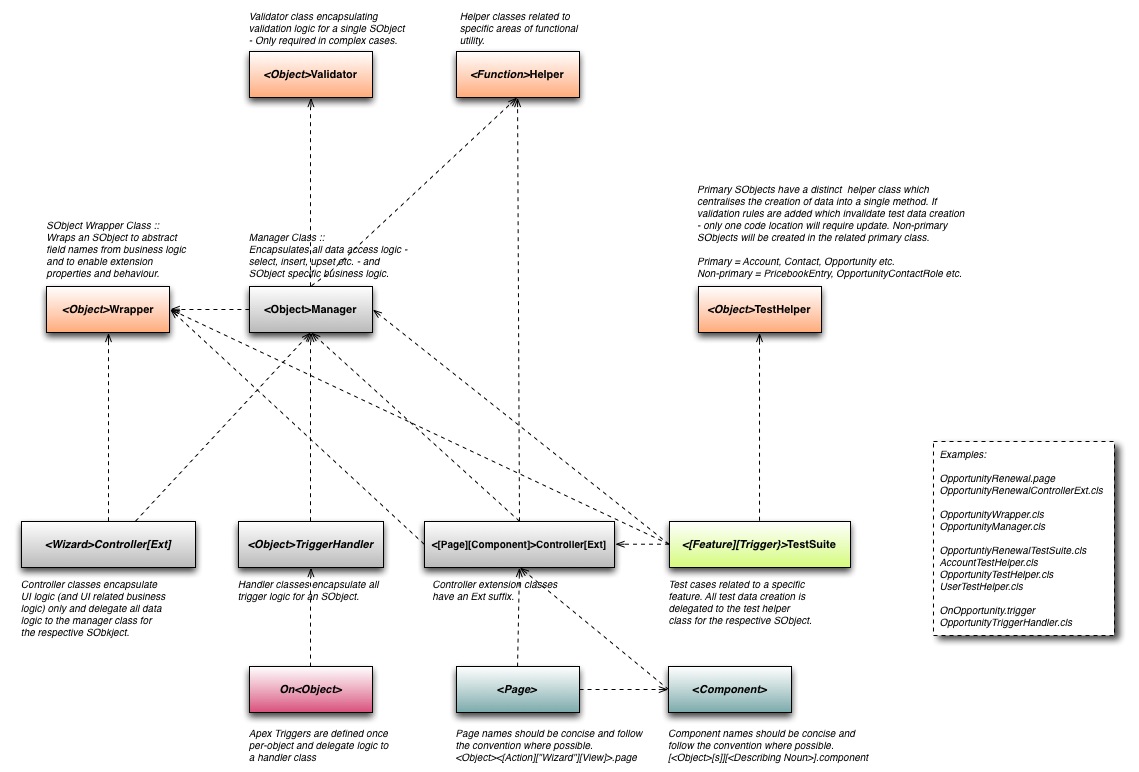
I’m a big advocate of setting out the key elements of the development process succinctly but unambiguously at the start of a software development project, particularly in cases where I have no prior history of working with the development team. Such process elements typically cover environments, coding standards, technical design and review requirements, source-code control strategy etc. Perhaps the most valuable area to cover are the basic patterns of construction (or Design Patterns), without this developers are left to their own devices in naming technical components and structuring code, which can be a serious issue with maintainability and standardisation. It is incredibly time expensive and de-motivating to address this after the fact. Instead a clear picture provided upfront can provide the development team with a strong reference covering 80% of the cases, the remainder can be addressed individually during technical design. The example below provides an example of a basic construction pattern which covers naming conventions and structural concerns. Following such a pattern makes the technical implementation predictable and should improve maintainability, the latter being a obligation to take seriously on consulting projects. My rule of thumb is to try and leave the org in a state a future me would consider acceptable.

Salesforce Logical Data Models

A robust and intelligent data model provides the foundation upon which a custom Salesforce implementation can be built. Mistakes made in the functional or technical build are typically inexpensive to rectify (if caught quick enough), however a flawed data model can be incredibly time and cost expensive to mitigate. At the start of all projects I produce a logical data model, example provided below. this starts out as blocks and lines and improves iteratively to include physical concerns such as org-wide defaults, relationship types etc.. Only after a few revisions will I consider actually creating the model as custom objects. I use OmniGraffle for such diagrams.

Org Behaviour Custom Setting

As a best practice I implement a hierarchy type Custom Setting (OrgBehaviourSettings__c) which enables a highly useful, org-level selective switching-off of dynamic behaviour such as Triggers. The setting usually has independent flags for workflow rules and validation rules also, with the setting fields being referenced in rule entry criteria and formula expressions respectively. Having such a setting in place (and fully respected across the declarative build and Trigger scripts) from the outset can be really useful for diagnostics and data loading. It may be advantageous in some cases to provide a different set of values for an integration user perhaps – do this with caution..

Example object definition
[sourcecode language=”xml”]
<?xml version="1.0" encoding="UTF-8"?>
<CustomObject xmlns="http://soap.sforce.com/2006/04/metadata"&gt;
<customSettingsType>Hierarchy</customSettingsType>
<customSettingsVisibility>Protected</customSettingsVisibility>
<description>Org-level behaviour settings – enable switching-off of Apex Triggers etc.</description>
<enableFeeds>false</enableFeeds>
<fields>
<fullName>TriggersEnabled__c</fullName>
<defaultValue>true</defaultValue>
<description>When set to True, Apex Triggers (coded to respect the setting) will execute – when set to false Apex Triggers exit immediately.</description>
<externalId>false</externalId>
<inlineHelpText>When set to True, Apex Triggers (coded to respect the setting) will execute – when set to false Apex Triggers exit immediately.</inlineHelpText>
<label>TriggersEnabled</label>
<type>Checkbox</type>
</fields>
<label>OrgBehaviourSettings</label>
</CustomObject>
[/sourcecode]

Example trigger code

[sourcecode language=”java”]
trigger OnAccount on Account (after update
// after delete,
// after insert,
// after undelete,
// before delete,
// before insert,
// before update
) {
OrgBehaviourSettings__c obs = OrgBehaviourSettings__c.getInstance();
System.debug(LoggingLevel.ERROR, obs);
if (!obs.TriggersEnabled__c) return;

AccountTriggerHandler handler = new AccountTriggerHandler(Trigger.isExecuting, Trigger.size);

// if (Trigger.isInsert && Trigger.isBefore){
// handler.onBeforeInsert(Trigger.new);
// } else if (Trigger.isInsert && Trigger.isAfter){
// handler.onAfterInsert(Trigger.new, Trigger.newMap);
// } else if (Trigger.isUpdate && Trigger.isBefore){
// handler.onBeforeUpdate(Trigger.new, Trigger.newMap, Trigger.oldMap);
// } else if (Trigger.isUpdate && Trigger.isAfter){
handler.onAfterUpdate(Trigger.new, Trigger.newMap, Trigger.oldMap);
// } else if (Trigger.isDelete && Trigger.isBefore){
// handler.onBeforeDelete(Trigger.old, Trigger.oldMap);
// } else if (Trigger.isDelete && Trigger.isAfter){
// handler.onAfterDelete(Trigger.old, Trigger.oldMap);
// } else if (Trigger.isUnDelete){
// handler.onAfterUndelete(Trigger.new, Trigger.newMap);
// }
}
[/sourcecode]

Don’t forget to populate the setting in test code (example below creates default org-level values).

[sourcecode language=”java”]
OrgBehaviourSettings__c obs = OrgBehaviourSettings__c.getInstance( UserInfo.getOrganizationId() );
obs.TriggersEnabled__c = true;
insert obs;
[/sourcecode]